Exness trades into a journal, without losing rows
Exness gives you a CSV of closed orders in the Personal Area, but the download stops at 1,000 records. An active scalper hits that in weeks. So either export in short date ranges, or skip files entirely: Exness runs MT4 and MT5, and RBSync syncs those live. One more Exness quirk works in your favour: its MetaTrader servers run on GMT+0, so timestamps are already UTC.
The Personal Area export
- Log in to the Personal Area and open Trading, then History of orders.
- Select the account and the time range.
- Choose Closed orders.
- Press Download CSV at the top.
Working around the 1,000 record cap
Exness's help says the CSV download is limited to 1,000 records. If your range holds more, you will not get a warning in the journal; you will just have a quietly incomplete year. Do this instead:
- Look at how many trades you do in a typical week.
- Pick a range that stays well under 1,000 rows. For 50 trades a day, that is about two weeks.
- Export each range, then import them one after another. Overlap a day at the edges; the journal skips duplicates by ticket.
Exness Terminal has no export
On the web Exness Terminal, Portfolio > Closed shows about the last 30 days, and Show previous 30 days loads more. Exness does not offer an export from there. If you trade on the Terminal, use the Personal Area CSV for the same account. Statements for any date range are also available from My accounts, the three-dot menu, then Manage statements.
Time and swaps
Exness says its MetaTrader platforms are set to GMT+0 and that this cannot be changed. That is unusual: most brokers run GMT+2 or GMT+3. It means an Exness file is already in UTC, so set UTC in the journal's settings and your session analysis lines up with no extra work. Rollover and swaps happen at 21:00 UTC in summer and 22:00 UTC in winter, which is 5 PM New York.
Commission on Raw Spread and Zero
Exness lists Raw Spread commission at up to USD 3.50 per lot per direction, and the Zero account from USD 0.05 per lot per side, varying by instrument. Exness does not document whether the Personal Area CSV puts commission and swap in their own columns. If the file has them, tag them in the mapper. If not, live sync will give you exact figures on every new trade.
A quick check that your fees landed
Take one 1 lot Raw Spread trade. At up to 3.50 per side, commission should be up to 7 USD round trip. If the journal shows zero commission on it, your file did not carry commission, and your net figures are really gross figures.
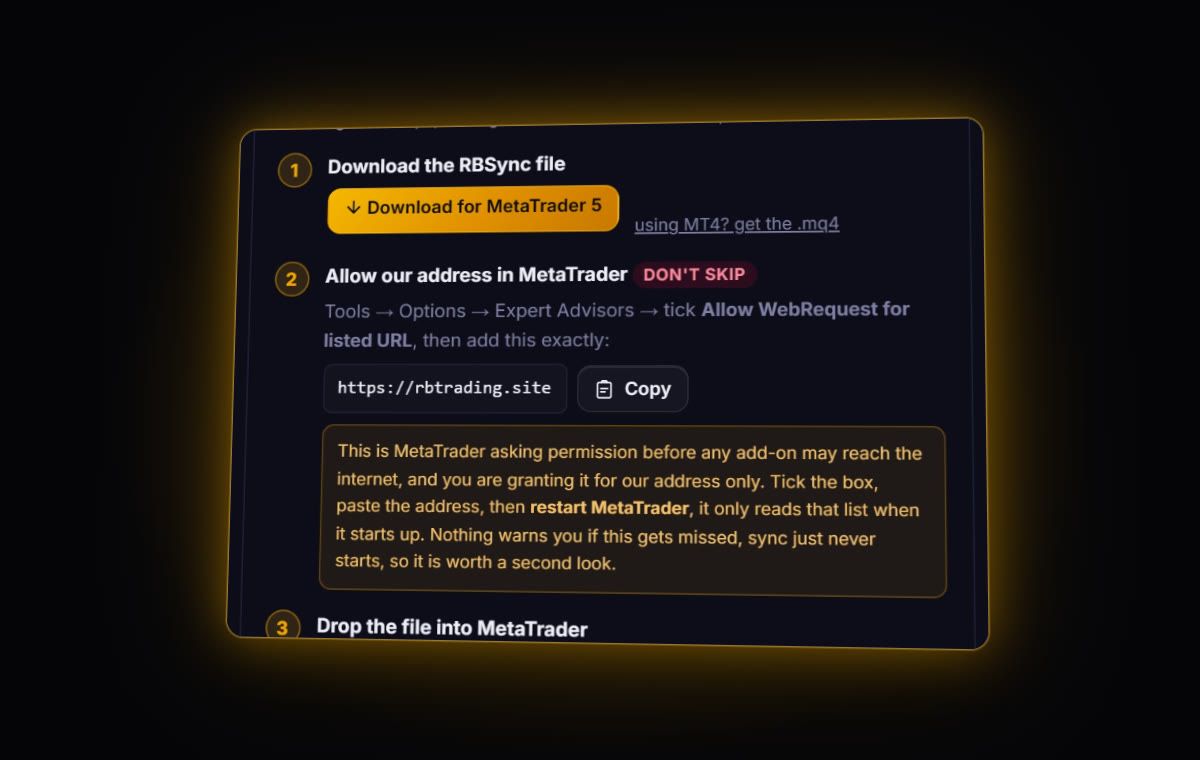
MT4 / MT5: live sync with RBSync. Trades arrive within seconds with ticket, prices, stop, commission and swap. Personal Area CSV: no dedicated Exness parser; the journal checks for a list of fills or opens the column mapper, which remembers your choices for the next file.
What to look at once it is in
- Trade count against result. Exness's high leverage and instant execution suit very active trading. Plot P&L against trades per day.
- Session results. UTC timestamps mean the session chart is right on day one.
- Drawdown. On high leverage, a few bad days compound fast. Check your peak to trough and what it takes to recover with the drawdown recovery calculator.
Several Exness accounts?
Exness makes it easy to open many accounts: Standard, Raw Spread, Zero, Pro, demo and live. Each one needs its own journal account, its own RBSync code and its own exports. The Personal Area CSV is also per account, so pick the right one in the account selector before you press Download CSV. A quick check after each import: the trade count in the journal should match the number of closed orders the Personal Area showed for that range.
Quick answers
How do I download my Exness trade history?
In the Personal Area open Trading, then History of orders, choose the account, time range and Closed orders, and press Download CSV.
Is there a limit on the Exness CSV export?
Yes. Exness says the CSV download is limited to 1,000 records, so export busy accounts in shorter date ranges.
What time zone does Exness MetaTrader use?
Exness sets its MetaTrader platforms to GMT+0, and it cannot be changed. Timestamps are effectively UTC.
Can I sync several Exness accounts at once?
Yes. Run the RBSync EA in each MetaTrader terminal with that account's own sync code, and each feeds its own journal account.
Sources
- Exness help: Personal Area, Trading
- Exness help: trading history
- Exness help: default time zone in MetaTrader
- Exness help: Raw Spread account
Last checked: 8 October 2026. Brokers move menus and change fees without notice, so confirm the current steps and costs on Exness's own site before you rely on them.
Your broker history, finally readable
Import your file, see your R, sessions and fees in one place. The free plan holds 50 trades.
Start free, no card