Journaling FXCM trades from Trading Station or MT4
On Trading Station, your closed trades sit in the History tab, and FXCM says the results can be exported to Excel with the button at the right corner of that tab. On MT4 at FXCM, use live sync instead. Before you export from Trading Station, check its time setting: FXCM offers UTC, server, local, financial time and New York, and the one you pick is the one your file carries.
Step 1: set the time zone
In Trading Station go to System > Options > General Trading and look at the time zone. FXCM lists five choices: UTC, Server, Local, Financial Time (where 00:00 is 5 PM New York) and New York. Set it to UTC for the export, then set UTC in the journal too. You can switch back afterwards.
Why bother: FXCM's own pages describe statement times differently depending on the account. Some describe statements in UTC; others describe combined statements stamped in the local time of the account's currency, such as New York time for USD accounts and London time for EUR and GBP accounts. Exporting from a platform you have set to UTC sidesteps the question.
Step 2: export the History
- Open the History tab (closed positions) in Trading Station.
- Set the date range at the top of the tab.
- Use the export button at the right corner of the History window to send it to Excel.
- In Excel, save the sheet as CSV. The journal's Excel reader is built for MetaTrader 5 reports, so CSV is the safe format for an FXCM file.
For formal statements, use MyFXCM > My Info > Reports > Get Report, or the Report button inside Trading Station. MT4 clients at FXCM can log in to Trading Station with the same details to get the same reports. These are for records; the History export is the one built for rows.
Rollover and commission
FXCM books rollover at 5 PM New York on positions open at that moment, with triple rollover on Wednesday, and posts it to the balance within about an hour. On Active Trader accounts, commission is charged at the open and at the close of each trade. FXCM UK lists Active Trader commission from 2 pounds per side per 100K above certain monthly volumes, with a minimum equity requirement. FXCM does not document whether the History export puts rollover and commission in their own columns, so check one overnight trade by hand: does its P/L match the balance change?
Into the journal
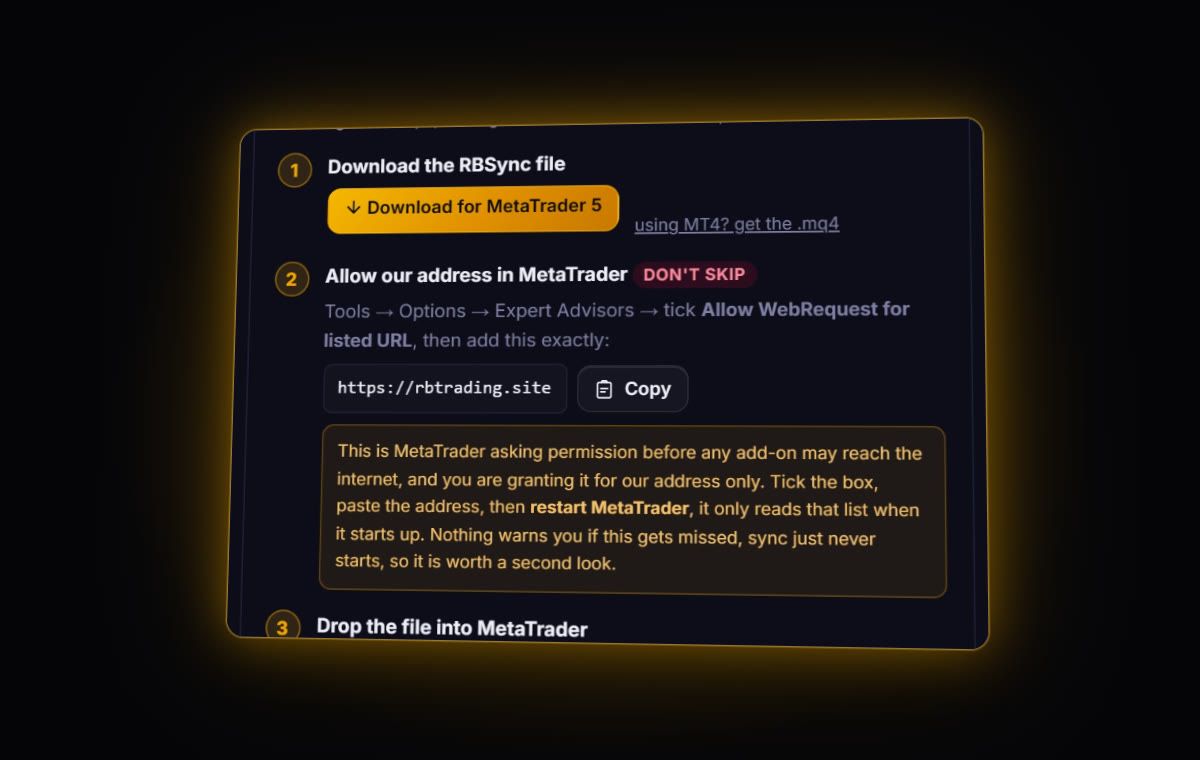
Trading Station: no dedicated FXCM parser. Import the CSV; the column mapper opens with real rows from your file. Tag Symbol, Open date, Close date, Direction, Size, prices and the net P/L. It remembers the mapping. FXCM MT4: live sync with RBSync, times converted from server time to UTC.
Trading Station sizes in amounts, often shown in thousands (K). If your size column says 100 for 100K, that is one standard lot. Tag it as size anyway; your P&L is right regardless, and you can still compare sizes trade to trade.
What to look at once it is in
- Holding through 5 PM New York. Rollover is the cost most FXCM traders never total up. Split your trades into intraday and overnight and compare net results.
- Day of week. With UTC timestamps, the weekday chart is finally trustworthy. Wednesday holds deserve a look because of the triple rollover.
- R. Add stops where the export left them blank and read results in R. Our R-multiple guide explains why this beats dollar P&L.
Statements on request
FXCM says daily and monthly statements are also available on request from customer support. If you are rebuilding an old year and the History tab no longer reaches back far enough, ask for them. They are a check figure: compare a month's total in the journal with the statement's closed P/L.
Quick answers
How do I export trade history from FXCM Trading Station?
Open the History tab, set the date range and use the export button at the right corner of the window to send it to Excel, then save as CSV for import.
What time zone are FXCM exports in?
Whatever Trading Station is set to. Choose UTC under System, Options, General Trading before exporting, and set UTC in your journal.
Can FXCM sync to a journal automatically?
FXCM MT4 accounts can, through the read-only RBSync EA. Trading Station accounts need a file export.
Can I log in to Trading Station with my FXCM MT4 details?
FXCM says MT4 clients can use the same credentials in Trading Station, which is handy for its reports.
Sources
- FXCM: how can I get my account statement report
- FXCM: what is the History tab
- FXCM: change the time zone in Trading Station
- FXCM UK: Active Trader
Last checked: 8 October 2026. Brokers move menus and change fees without notice, so confirm the current steps and costs on FXCM's own site before you rely on them.
Your broker history, finally readable
Import your file, see your R, sessions and fees in one place. The free plan holds 50 trades.
Start free, no card