A small read-only Expert Advisor called RBSync runs inside your own MetaTrader 5 terminal and sends each closed trade, every open position and your balance to the journal. You stop typing trades in. You start seeing which setups pay and how much room is left on your prop account.
Free plan: 50 trades, no card, no time limit · Pro $29.99/mo or $299/yr · 30-day money-back guarantee
4.9 from members
Close a position in MT5 and it lands in the journal with entry, exit, stop, target, lots, commission, swap and its R, ready for your notes and tags.
The EA reads three things: open positions, closed history, and balance and equity. Here is what you get from them.

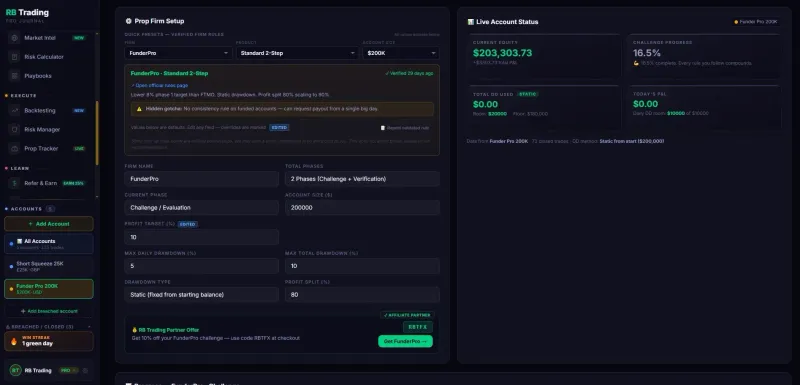
The Prop Tracker, from the journal itself: firm rules on the left, live account status on the right.
These are the same steps the journal shows you in Settings. You need the journal open in one window and MetaTrader 5 in the other.
The full guide, with troubleshooting for every error, is on the broker sync setup page. On MT4 instead? The MT4 trading journal page has the same steps for that terminal.
Updated 20 October 2026
Open the History tab of the Toolbox, right-click the list and choose Report, then save it as HTML or Excel (XLSX). Drop that file into the journal’s Import window and every closed trade comes in with its stop loss, take profit, commission, swap and profit.
RBSync has no order function in it. The MetaTrader files contain no OrderSend, OrderModify or OrderClose call, so there is no path in the code to place, change or close a trade. It never asks for your trading password or investor password: it runs inside a terminal you are already logged into, and the only link to your journal is a random sync code you make yourself.
What it sends, every few seconds and on each trade event: your account number, server, currency, balance, equity and net deposits, and for each position its symbol, side, lots, prices, stop, target, profit, commission, swap, times and comment. Read the full list on the security page.
Analytics EAs like this are in wide use on funded accounts. If your firm has unusual EA rules, check its terms before you attach it.
There is no free trial: the free plan is the trial. Full table on the pricing page.
Start free with your email, make a sync code and attach RBSync. Your next closed trade arrives on its own.
Start Free →Free plan: 50 trades, no card, no time limit · Pro $29.99/mo or $299/yr · 30-day money-back guarantee
Yes. A read-only Expert Advisor called RBSync runs in your own MetaTrader 5 terminal and sends closed trades, open positions and your balance to the journal. New trades show within about a minute while the journal is open. You can also import an MT5 statement or CSV instead.
No. RBSync never asks for your trading password or investor password. It runs inside a terminal you are already logged into, and the only link to your journal is a random sync code you create in the journal.
No. The EA has no order functions in it: no OrderSend, OrderModify or OrderClose. It reads open positions, closed history and balance and equity, and nothing else. It ships as plain source code (.mq5) that you can read before you run it.
Yes, for your first 50 trades on the free plan, with no card and no time limit. Pro, at $29.99 a month or $299 a year, syncs every trade with no cap and comes with a 30-day money-back guarantee.
Yes. Link the synced account to the Prop Tracker and your daily and total drawdown update as open trades move. The EA only reads, so it does not interact with trading rules, but if your firm has unusual EA rules, check its terms first.
Yes, the EA can only send while the terminal runs. If it closes, nothing is lost: your history catches up when it reopens. Traders who run MT5 on a VPS get the sync around the clock with it.
Open the History tab of the Toolbox, set the period, right-click the list and choose Report, then save it as HTML or, where your terminal offers it, Excel (XLSX). In the journal, pick the account, click Import in the top bar and drop the file. Closed trades come in with stop loss, take profit, commission, swap and profit. To skip files altogether, the read-only RBSync EA syncs every trade live.