BlackBull Markets trades, synced or exported
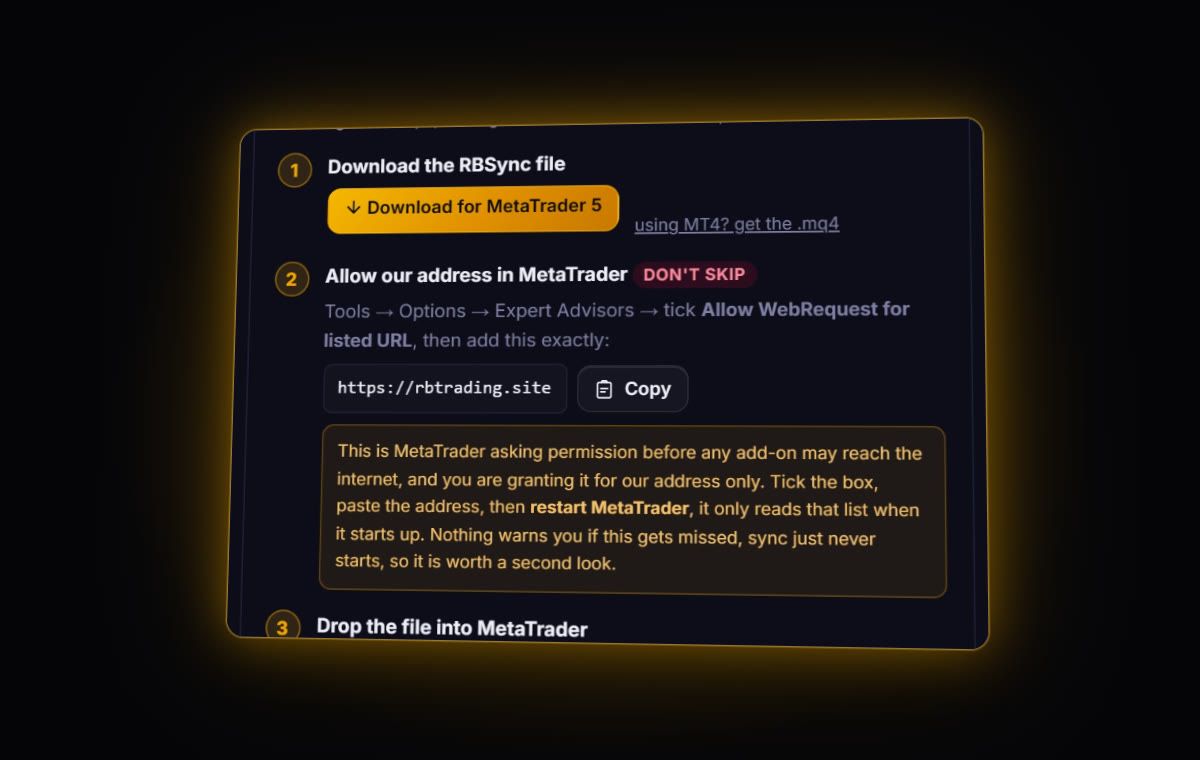
BlackBull offers MT4, MT5, cTrader and TradingView. The first three sync live into the journal with RBSync, which is the route we recommend. For a file, BlackBull's own MT5 guide sends you to the Toolbox > History tab, where you filter by time range and export with a right-click. TradingView trades come in by file through the column mapper.
Disclosure: RB Trading is a BlackBull Markets affiliate partner. This guide is about getting your history into a journal, and everything on it applies whether you opened your account through us or not.
Exporting from MT5
BlackBull's guide to checking trade history in MT5 goes like this: open the Toolbox with Ctrl+T or from the View menu, select the History tab, newest trades at the top, filter by time range or instrument, and right-click to export. In MetaTrader 5 that right-click menu offers Report, with HTML and Excel versions.
- Ctrl+T, then the History tab.
- Right-click and switch the view to Positions, so each row is a whole trade.
- Set the period. Choose a custom range that covers everything you want.
- Right-click > Report > Excel or HTML.
MT4 is the same idea: Account History, right-click, period, Save as Report. cTrader: History tab, Statement, save.
Positions, deals or orders?
MT5 can show history three ways. Orders lists every instruction, including ones that never filled. Deals lists every execution, so one trade with a partial close is three rows. Positions joins those into one row per trade, with entry, exit, commission, swap and profit. For a journal, Positions is the one. MetaQuotes notes that a deal's total result is profit minus commission, fees and swap.
Server time
BlackBull says all trading times on its hours page are in MT5 server time, and the server clock read GMT+3 when we checked on 8 October 2026. BlackBull does not document the winter offset. Live sync removes the guesswork: the EA sends the server's offset and the journal stores UTC.
Commission on ECN Prime
BlackBull's account comparison lists ECN Prime at US$3.00 per lot per side on FX and metals, with spreads from 0.0. A 1 lot round trip is US$6. Check one 1 lot trade in the journal after import; if commission shows US$6, your fee figures are complete.
Live: RBSync on MT4, MT5 or cTrader. File: MT HTML, MT5 Excel or cTrader CSV, read directly. TradingView: export from the Trading Panel and import through the column mapper.
Review checklist
- Separate CopyTrader trades. If you copy others, keep those trades in their own journal account. They are not your decisions.
- Fees as a share of gross. On ECN pricing, fees are visible and easy to total. Look at them monthly.
- R by setup. MT history keeps your stops, so R is there from day one. Read our R-multiples guide if R is new to you.
Running more than one BlackBull account
A common setup is an MT5 account for forex and gold, and a cTrader account for indices. Give each its own journal account and its own RBSync code. The journal can then show each on its own or combined, and a bad month on one never hides inside a good month on the other. If you also trade the same account through TradingView, do not import the TradingView history on top of a synced MetaTrader account, or every trade appears twice.
Quick answers
How do I export my BlackBull Markets trade history?
In MT5 open the Toolbox with Ctrl+T, go to History, set the time range, right-click and choose Report, then HTML or Excel. MT4 uses Account History and Save as Report.
Can BlackBull Markets sync to a trading journal?
Yes. BlackBull's MT4, MT5 and cTrader accounts sync live with the read-only RBSync add-on. TradingView trades need a file.
What is BlackBull ECN Prime commission?
BlackBull lists US$3.00 per lot per side on FX and metals for ECN Prime, so US$6 per lot round trip.
Will I get duplicates if I sync MT5 and also import a report?
The journal skips trades it already has by ticket and flags likely duplicates, but the clean habit is one route per account: sync, or import, not both.
Sources
- BlackBull: how to check your trade history in MT5
- BlackBull: account comparison
- BlackBull: trading hour changes
- MetaQuotes: MT5 trading history report
Last checked: 8 October 2026. Brokers move menus and change fees without notice, so confirm the current steps and costs on BlackBull Markets's own site before you rely on them.
Your broker history, finally readable
Import your file, see your R, sessions and fees in one place. The free plan holds 50 trades.
Start free, no card