CMC Markets history into a journal, without the mess
On CMC's Next Generation platform your trade history lives under Account > History. Set a date range, pick the type filter, and export with the icons in the bottom left corner. Choose CSV. The RB Trading journal recognises CMC's product, amount and P/L headers and maps them for you, so most files go straight to the preview without the mapper.
Exporting from Next Generation, step by step
- Open the Account menu and choose History.
- Use the Date/time control in the top left of the History window to set your range. Go wider than you think: a position opened before your start date and closed inside it needs both legs.
- Use the Type filter. For a journal you want closed trades. Holding costs and cash movements can come later.
- Export with the icons in the bottom left. CMC's help pages mention PDF, Excel and a CSV version. Take the CSV.
There is also Account > Statement Centre, which gives daily, monthly and annual statements for live accounts. Those are for your records. The History export is the one with one row per trade.
Reading the columns
CMC names things in its own way. Here is how the journal reads the common headers when it detects a CMC file:
| CMC header | Journal field | Watch out for |
|---|---|---|
| Product / Market | Symbol | Product names contain spaces. The journal keeps a symbol up to its first space, so change "UK 100" to UK100 first. |
| Direction / Buy-Sell | Direction | Short trades show as Sell. |
| Amount / Units | Size | Units per point for spread bets, units for CFDs. |
| Opening and closing price | Entry and exit | Check the decimal places on index prices. |
| P/L | Net P&L | Whether holding costs are inside it depends on the row type. |
| Order ID / Reference | Ticket | Used to stop duplicates on re-import. |
CMC's public help pages do not publish an exact column list, so treat this table as the pattern the journal looks for, not a promise of CMC's exact wording. If your file uses different words, the column mapper opens and you tag the columns yourself once.
Gotchas specific to CMC
Holding costs are separate. CMC charges a holding cost on positions kept past the daily cut-off. It shows as its own entry in history, not as part of the trade's P/L. If you want your swing trades to be honest, add those holding costs to the trade's swap field, or at least look at the total once a month.
Partial closes. If you close half a position, CMC records a separate closing entry for that half. Each one imports as its own trade. That is accurate, but if you think of it as one idea, tag both halves with the same setup so your setup stats still count it properly.
Spaces in product names. In our test, a CMC style row for "UK 100" imported with the symbol "UK". That merges every market starting with UK into one line of stats. Find and replace product names with one-word codes (UK100, US500, GER40) before importing. It takes a minute and makes per-market stats trustworthy.
Excel files. The journal's Excel reader is built around MetaTrader 5 reports and reads the first sheet. For CMC, CSV is the safer choice.
Getting it into the journal
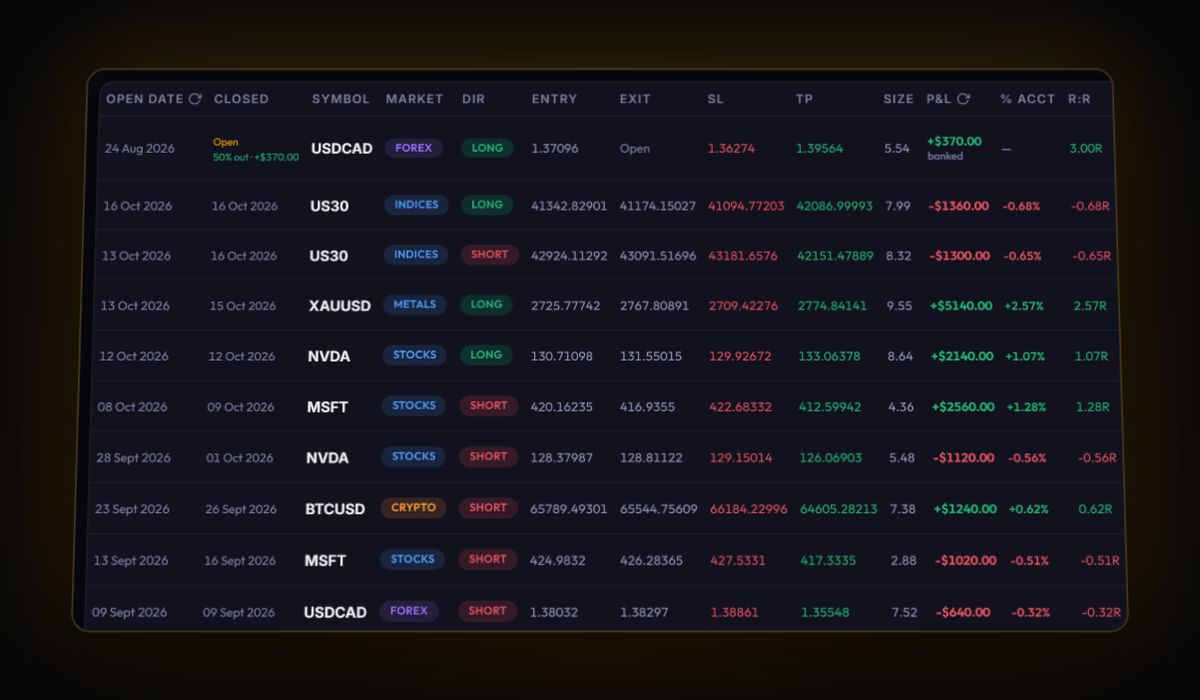
Open Import, drop the CSV, press Import Trades. When the headers match CMC's pattern, the journal maps Symbol, Direction, Size, prices, P/L and ID for you. If not, the column mapper appears with real rows from your file so you can see what each column holds. CMC MT4 accounts can sync live with RBSync instead.
Three things worth checking after the import
- Win rate by market. CMC offers thousands of products, and most people trade far too many of them. Sort the per-symbol table by trade count. Markets you traded fewer than ten times are often where the losses hide.
- Holding cost share. Total holding costs divided by gross profit. Above roughly a tenth, your holding period deserves a hard look.
- R per trade. Add your stops and read results in R. A good week in pounds can still be a bad week in R if your size crept up. Use the position size calculator before the next trade, not after.
Quick answers
How do I export my trade history from CMC Markets?
On the Next Generation platform open Account, then History, set the Date/time range and Type filter, and use the export icons in the bottom left corner. CSV is the best format for a journal.
Are CMC holding costs included in the trade P/L?
They are charged separately as their own history entries. Add them to each trade's swap field, or review them as a monthly total.
Does the journal recognise CMC files automatically?
Yes, when the headers include product, amount and P/L it maps them automatically. Any other layout goes through the column mapper, which remembers your choices.
Sources
Last checked: 8 October 2026. Brokers move menus and change fees without notice, so confirm the current steps and costs on CMC Markets's own site before you rely on them.
Your broker history, finally readable
Import your file, see your R, sessions and fees in one place. The free plan holds 50 trades.
Start free, no card