How to journal your IG trades, from export to review
IG gives you three different places to see your past trades, and only one of them is built for review. If you trade on MT4 with IG, skip exports and sync live with RBSync. If you trade on IG's own web platform or app, you pull your activity from My IG, then bring it in as a CSV through the column mapper. The PDF statements IG emails you are for records, not for a journal.
Step 1: find the right history in My IG
Log in to My IG, open the live accounts tab and pick the account you traded. You will see two tabs that sound similar and are not:
- statements: set a period and press download or show. These are formal account statements. Good for tax and disputes, awkward for analysis because they are laid out for reading, not for rows.
- history: choose the activity type and date range, then press show history. This is the per-deal view you want for a journal.
IG's help centre documents a CSV download from the History > Transactions view for share dealing accounts. For CFD and spread betting accounts, the help pages we checked describe a daily statement emailed as a PDF the working day after you trade, and an annual ledger summary. If your history screen shows a download option, take the CSV. If you only get PDFs, read on: the journal cannot parse IG's PDFs, and we would rather tell you that now than after you have spent ten minutes exporting.
Step 2: know which rows are trades and which are charges
IG's activity and transaction views mix several kinds of row together. When you open the file, sort it by the type or description column and you will usually find:
| Row type | What it is | Keep for the journal? |
|---|---|---|
| Deal / trade closed | The realised result of a position you closed | Yes, this is the trade |
| Funding or overnight charge | The daily cost of holding a CFD or spread bet past the cut-off | Add to the trade as swap |
| Commission | Share CFDs carry a commission; index and FX CFDs are priced in the spread | Add to the trade as commission |
| Dividend adjustment | Cash in or out on index and share positions held over an ex-date | Optional, but it is real P&L |
| Deposits, withdrawals, interest | Cash movements | No |
IG says it also sends an overnight statement at the end of each day listing every deal and its associated charges. That email is the quickest way to sanity check a single day if a number in the export looks wrong.
Spread betting accounts are quoted per point
If you spread bet in the UK, size is a stake per point, not lots or units. A bet of 2 pounds a point on the FTSE that moves 40 points is 80 pounds. When the mapper asks you for Size, tag the stake column. P&L is still the realised figure, so your dollar or pound stats will be right either way, but size matters if you want position size analysis to make sense.
Step 3: import it into the journal
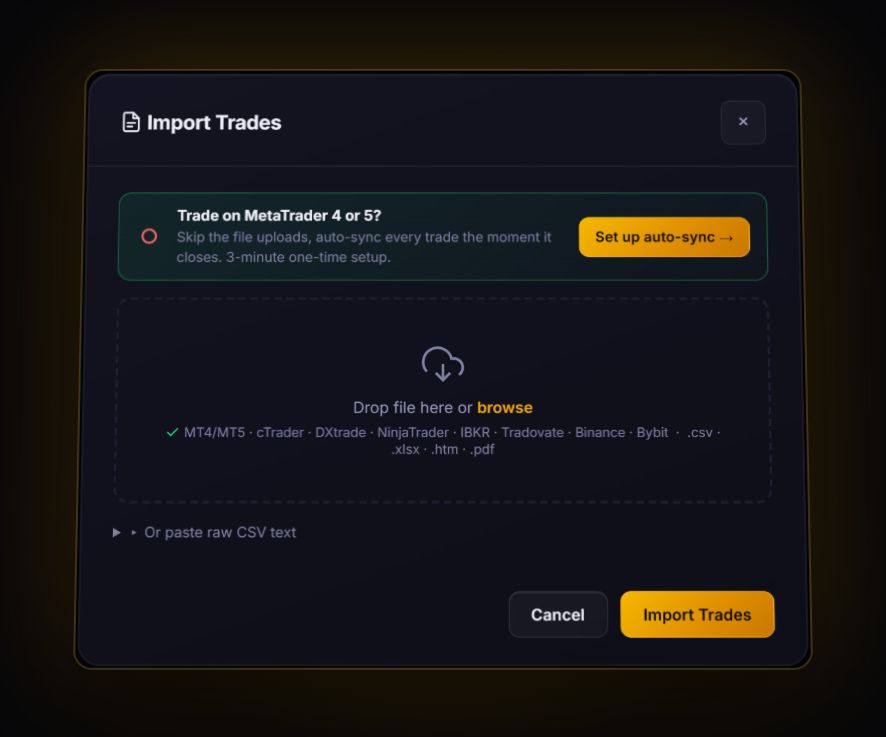
IG web or app: no dedicated IG parser. Drop the CSV into Import and the journal opens the column mapper. Tag Symbol (the market name), Open date, Net P&L, and anything else you have. It remembers your choices for the next file. IG MT4: install the RBSync EA once and every trade arrives live, with server time converted to UTC.
Three tips that save a re-import later:
- Export one account at a time. IG often gives you a spread bet account and a CFD account side by side. Mixing them in one journal account blends stake-per-point and contract sizes.
- Turn market names into one-word codes. The journal keeps a symbol up to its first space. We tested it: "US 500" and "US Tech 100" would both be stored as "US" and merge into one market. Find and replace them with codes like US500 and USTECH100 before you import, and use the same code every time.
- Remove deposit and withdrawal rows first. They have no symbol and the mapper will skip them, but deleting them keeps the preview clean.
What to look at once your IG trades are in
Funding drag on held positions. IG CFDs and spread bets charge funding every night you hold through the cut-off. A swing trader who holds index positions four nights a week can lose a real slice of gross profit here. In the journal, compare gross P&L to net on your multi-day trades only.
R, not pounds. IG history has no stop loss on closed deals, so add the stop you used to the trades you want to study. Once a trade has a stop, the journal shows it in R, and a 3R winner on a small stake stops looking smaller than a 0.5R winner on a big one. The R-multiple calculator shows the maths on one trade.
Time of day. IG timestamps follow your account settings and region. Set your time zone in the journal's settings, then open the time-of-day heatmap. Index traders usually find most of their money is made, or lost, in the first ninety minutes after the cash open.
Quick answers
Can I sync IG to a trading journal automatically?
Only if you trade IG through MetaTrader 4. The RBSync EA reads your MT4 account and sends each closed trade to the journal. Trades on IG's own web platform or app need a file export.
Does IG export trade history as CSV?
IG's help centre documents a CSV download for share dealing transaction history. CFD and spread betting statements are emailed as PDFs. Use the history tab's download where it is offered.
Why is there no stop loss in my IG history?
Closed deal rows record the result, not the stop you had. Add the stop in the journal on the trades you review and it will calculate R for you.
Sources
- IG: how to generate a statement or ledger summary
- IG: where can I see the fees I have been charged
- IG: view MT5 trade history and generate reports
Last checked: 8 October 2026. Brokers move menus and change fees without notice, so confirm the current steps and costs on IG's own site before you rely on them.
Your broker history, finally readable
Import your file, see your R, sessions and fees in one place. The free plan holds 50 trades.
Start free, no card