Binance trading journal: export your history and journal it in R
On Binance, spot trades export from Orders › Spot Order › Trade History › Export Trade History, up to one year per file. Futures orders export from the USDⓈ-M or COIN-M order history with the Export button. The RB Trading journal recognises Binance-style columns such as Realized Profit, Fee Asset and Order Side, and pairs individual fills into complete trades for you.
Last checked: 8 October 2026. Exchange menus, fees and rules change, so confirm on the exchange’s own site before you rely on them.
Binance is the exchange most of our crypto users start on, and its exports are detailed enough to journal well. The two things that trip people up are fees paid in BNB, which hide the real cost of a trade in a different coin, and the difference between USDⓈ-M and COIN-M futures, which settle profit in different currencies.
Export your spot trade history
- On the website, open your profile menu and go to Orders › Spot Order › Trade History.
- Click Export Trade History, set the start and end dates, and click Generate.
- Binance notifies you when the file is ready. Download the CSV. The link stays valid for 7 days.
Each statement covers up to one year, from any start date after 13 July 2017, and you can generate 5 statements a month. Times are in UTC, so a trade you placed at 9pm in New York shows the next day’s date. On the app the path is Trade › Orders › Trade History › Download: the last six months export straight away, up to 10,000 rows, and older ranges are generated in the background.
Export your futures history
For futures, go to Orders › USDⓈ-M Futures Order (or COIN-M) › Order History › Export. Choose Beyond 3 months, Custom for older history. This export is order-level. Realised P&L, commission and funding fees are shown in the futures Transaction History view, so check there for the funding you paid. Funding on most contracts settles every 8 hours, at 00:00, 08:00 and 16:00 UTC, and some USDⓈ-M contracts settle every 4 hours.
Binance’s help pages describe the order-history export for futures but do not list the CSV columns. Open the file before importing and confirm it has a symbol, side, quantity and price on every row.
Fees paid in BNB: put them back in dollars
If you pay fees with BNB, the fee column shows a small amount of BNB and the Fee Asset column says BNB. Your USDT P&L then looks better than it is, because the cost left a different wallet.
You buy and later sell 0.5 ETH. Entry 2,400, exit 2,520, stop was 2,340. Gross profit: 0.5 × 120 = 60 USDT. Risk: 0.5 × 60 = 30 USDT, so 1R is 30 and the gross result is 2.00R.
The two fills show fees of 0.00155 BNB and 0.00163 BNB. With BNB at 580, that is 0.90 + 0.95 = 1.85 USDT.
Net profit 58.15 USDT, or 1.94R. Small on one trade. Across a few hundred trades it is the difference between the edge you think you have and the one you do.
USDⓈ-M versus COIN-M
| USDⓈ-M | COIN-M | |
|---|---|---|
| Margin and P&L in | USDT or USDC | The coin itself, such as BTC |
| Contract size | Quantity of the coin | Fixed USD value per contract |
| Journal it in | USDT, straight from the export | Pick one unit, coin or USD, and stay with it |
COIN-M results are in coin, and the coin’s own price moves while you hold. A trade that made 0.01 BTC is worth more in dollars if BTC rose during the trade. Keep COIN-M on its own account in your journal so its R figures are not mixed with dollar results. The Deribit page works through an inverse contract example in both units.
How the import works
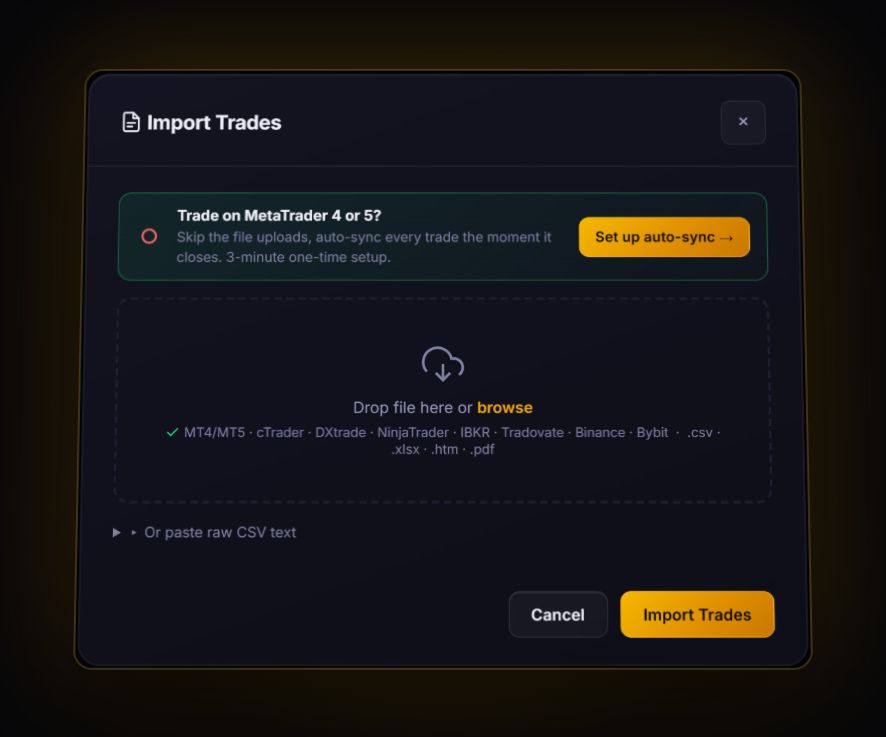
- In the journal, open Import and choose the CSV option, or pick Binance / Bybit (Crypto) in the paste box.
- The journal reads headers such as
Realized Profit,Fee AssetandOrder Sideand treats the file as a crypto export. - A fill export has one row per execution. The journal pairs buys and sells per symbol first in, first out into round trips, and anything unmatched becomes a currently open position.
- Add your stop to each trade, if it was not in the export, so the journal can show R. Then tag the setup.
Set the account’s cost preset
For trades you log by hand, set the account’s crypto cost preset. Binance’s base futures fee for a regular user is 0.02% maker and 0.05% taker. The journal’s perp preset uses 0.055% per side with 0.01% funding per 8 hours, which is slightly conservative for Binance. Choose Custom and enter 0.05% if you mostly take liquidity, or your own VIP rate.
Binance journal questions
How far back can I export Binance trade history?
Spot statements can start from any date after 13 July 2017, with up to one year per statement and 5 statements a month. Older futures orders use the Beyond 3 months, Custom option on the order history export.
Can the RB Trading journal sync with Binance automatically?
No. Binance history comes in by CSV import. Live sync in the journal covers MT4, MT5 and cTrader.
Why does my Binance P&L ignore fees paid in BNB?
Because the fee left your BNB balance, not your USDT balance. Convert each fee to USDT at the price when it was charged and subtract it to get net P&L.
Sources
Track it in a journal that does the maths
Log the trade once. R, fees and the weighted average entry are worked out for you.
Start free, no card